


 Web Page
INTRODUCTION
It allows you to add a web page into the EVE Remote user interface.
USE CASES
- The user wants to check a specific web page without going out the App.
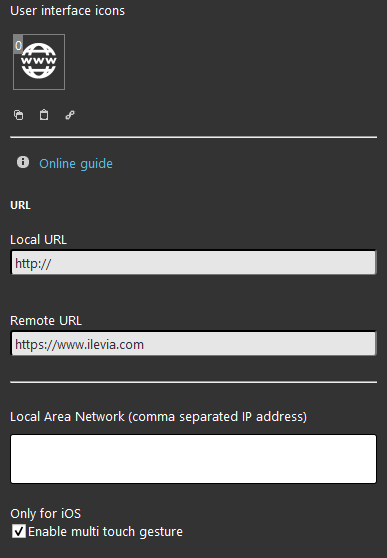
COMPONENT’S PROPERTIES
This component’s sample is made by using WEB gateway.
Please refer to “Gateways / Protocols” guide in order to get further info.
Local URL: Enter the URL of the local web page (ex: http://192.168.1.1) you want to be displayed on the interface;
Remote URL: Enter the URL of the remote web page (ex: http://www.google.it) you want to be displayed on the interface;
Other neighbour connected LAN: Enter here the address of a local network, add the first 3 digits of your IP class, for example if you want to connect to 192.168.0.1 address you must enter 192.168.0.
Only for iOS
Enable multi touch gesture: it allows the zoom feature of the web page.
 Ilevia Control
Three different view mode possibilities: “CLASSIC”, “MODAL” and “HIDDEN”. Learn more about the component’s view modes.
CLASSIC VIEW
Here is the visual result of the component on Ilevia Control (Classic).
Web Page is directly opened inside Ilevia Control without using an external browser.
Classic view

MAP VIEW
Here is the visual result of the component on Ilevia Control (Map Styles).
Web Page is directly opened inside Ilevia Control without using an external browser.
Modal view: The Modal view requires the user to open the Web page component details to display the web page configured in the component settings.
Popup view: The Popup view automatically opens the web page configured in the Web page component settings.
Modal view mode

Popup view mode
